Best CRM Development Companies in 2026 Custom vs Off-the-Shelf and How to Choose
The first question any CRM development agency worth talking to should ask you is: do you actually need a custom CRM, or do you need a properly configured Salesforce, HubSpot, or Pipedrive?
Most businesses that say they need a custom CRM actually need a well-configured existing CRM with a few custom integrations. Building a custom CRM from scratch when HubSpot at $50 per user per month would meet 90% of the requirements is a $15,000 to $30,000 mistake made in the name of “we need something specific to our process” the same budget-planning trap we break down in our custom software development cost guide.
That’s why choosing the best CRM development companies requires more than comparing portfolios or development costs. You need a partner that can determine whether custom development is justified or whether platforms such as Salesforce, HubSpot, or Pipedrive can meet your requirements with the right configuration and integrations.
According to Grand View Research, the global CRM market is estimated to reach $86.4 billion in 2026 and is projected to grow at a 9.3% CAGR through 2033.
The cases where custom CRM is genuinely the right answer are specific and definable. This guide covers those cases, what custom CRM development actually costs, and how to find an agency capable of building it correctly.
The Custom vs Off-the-Shelf Decision
When you genuinely need a custom CRM:
Your business model is sufficiently unusual that standard CRM contact-opportunity-deal pipeline structures do not map to your reality. Examples: a construction company managing projects with hundreds of sub-contractors across multiple sites (not standard sales pipeline), a healthcare organisation managing patient journeys across multiple care settings (not standard sales pipeline see our breakdown of healthcare software development companies for how compliance shapes these builds), a real estate developer managing properties, buyers, and agents simultaneously with custom approval workflows, or a financial services firm managing client relationships with compliance obligations that standard CRM audit trails do not satisfy.
Your CRM must be the system of record for deeply integrated proprietary data not just contacts and deals, but inventory, production scheduling, project management, and financial data that existing CRMs cannot hold or connect to cleanly.
Your industry has specific regulatory requirements HIPAA data handling, financial services compliance, government contracting standards that commercial CRMs cannot satisfy without expensive enterprise compliance add-ons that cost more than custom development.
When off-the-shelf is the right answer:
Standard sales pipeline management leads, opportunities, contacts, deals, forecasting. Off-the-shelf CRM: HubSpot, Pipedrive, Salesforce, Zoho. Marketing automation integration. Standard customer service ticketing. Any process that a CRM app ecosystem (5,000+ apps in Salesforce AppExchange, 1,000+ in HubSpot Marketplace) already solves. It’s the same custom-vs-configured calculus we walk through in custom vs template website cost most of the time, the templated option wins on time-to-value.
The cost comparison:
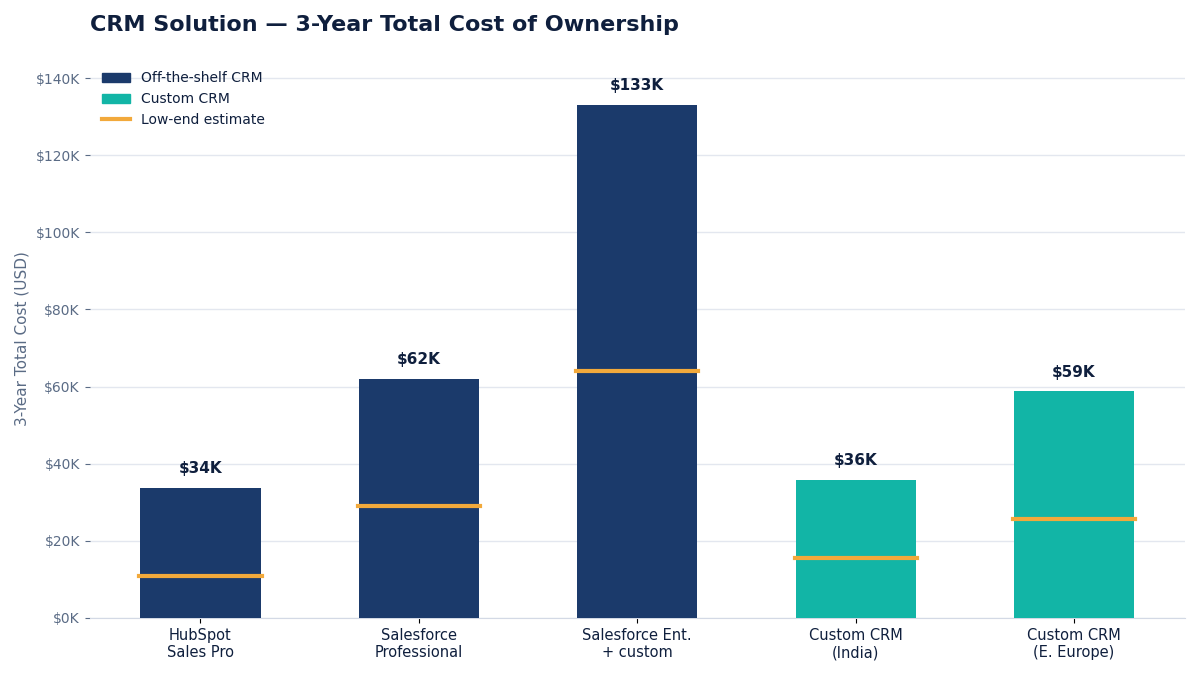
| Solution | Development Cost | Annual Licence (5 users) | 3-Year Total Cost |
| HubSpot Sales Pro | $0–$5K (configuration + custom integrations) | $3,600–$9,600 | $10,800–$33,800 |
| Salesforce Professional | $2K–$8K (configuration + customisation) | $9,000–$18,000 | $29,000–$62,000 |
| Salesforce Enterprise + custom | $10K–$25K | $18,000–$36,000 | $64,000–$133,000 |
| Custom CRM (India development) | $12K–$25K | $1,200–$3,600 (hosting) | $15,600–$35,800 |
| Custom CRM (Eastern Europe) | $22K–$45K | $1,200–$3,600 (hosting) | $25,600–$58,800 |
For teams of 5 to 15 users with standard processes, HubSpot or Pipedrive is almost always the right answer, lower 3-year total cost, faster to implement, and maintained by a vendor. For larger teams with complex requirements, the 3-year cost comparison narrows. For specific use cases that standard CRMs cannot support, custom development often wins on both cost and capability over a 3-year horizon; our full comparison of India vs Eastern Europe development costs is worth reading before you shortlist a region.
Custom CRM Features at the $5K–$30K Budget Level
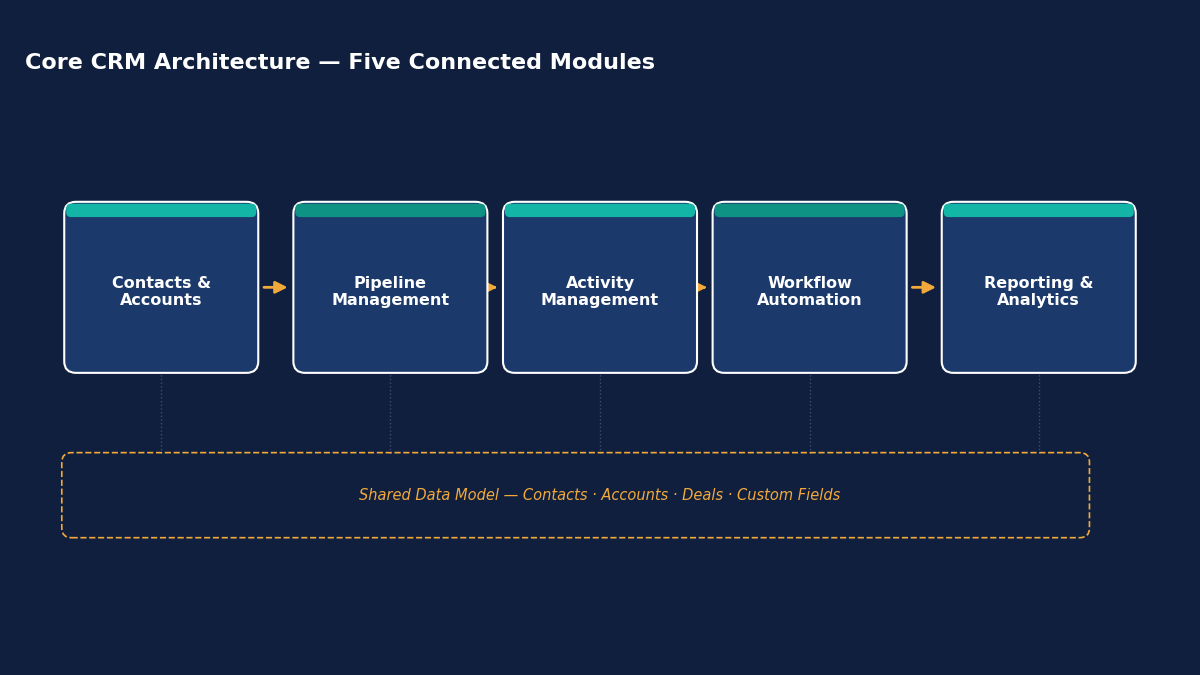
What your budget realistically builds:
| CRM Type | Core Features | India Cost | Eastern Europe Cost | Timeline |
| Simple sales CRM | Contact management, deal pipeline, activity logging, basic reporting | $6K–$12K | $12K–$22K | 8–14 weeks |
| Industry-specific CRM | Custom pipeline stages, industry-specific data fields, workflow automation for specific process | $10K–$18K | $20K–$35K | 12–20 weeks |
| Real estate CRM | Property management, buyer/seller profiles, viewing scheduling, offer tracking, commission management | $10K–$18K | $20K–$35K | 12–20 weeks |
| Healthcare CRM (non-HIPAA) | Patient acquisition, appointment management, communication tracking, referral management | $10K–$18K | $20K–$35K | 12–20 weeks |
| Field sales CRM (mobile-first) | Mobile app for field reps, offline mode, GPS check-in, territory management | $12K–$22K | $22K–$42K | 14–22 weeks |
| B2B account management CRM | Account hierarchy, multi-contact per account, relationship mapping, revenue tracking | $10K–$18K | $20K–$35K | 12–20 weeks |
| CRM + marketing automation | CRM + email sequences, lead scoring, campaign management, website integration | $14K–$24K | $28K–$46K | 16–24 weeks |
| CRM with ERP integration | Custom CRM connected to SAP/Oracle/NetSuite for order and account data | $14K–$25K | $28K–$48K | 16–26 weeks |
The Core Architecture of a Custom CRM
Understanding the architecture helps you evaluate whether an agency is proposing something appropriate for your requirements.
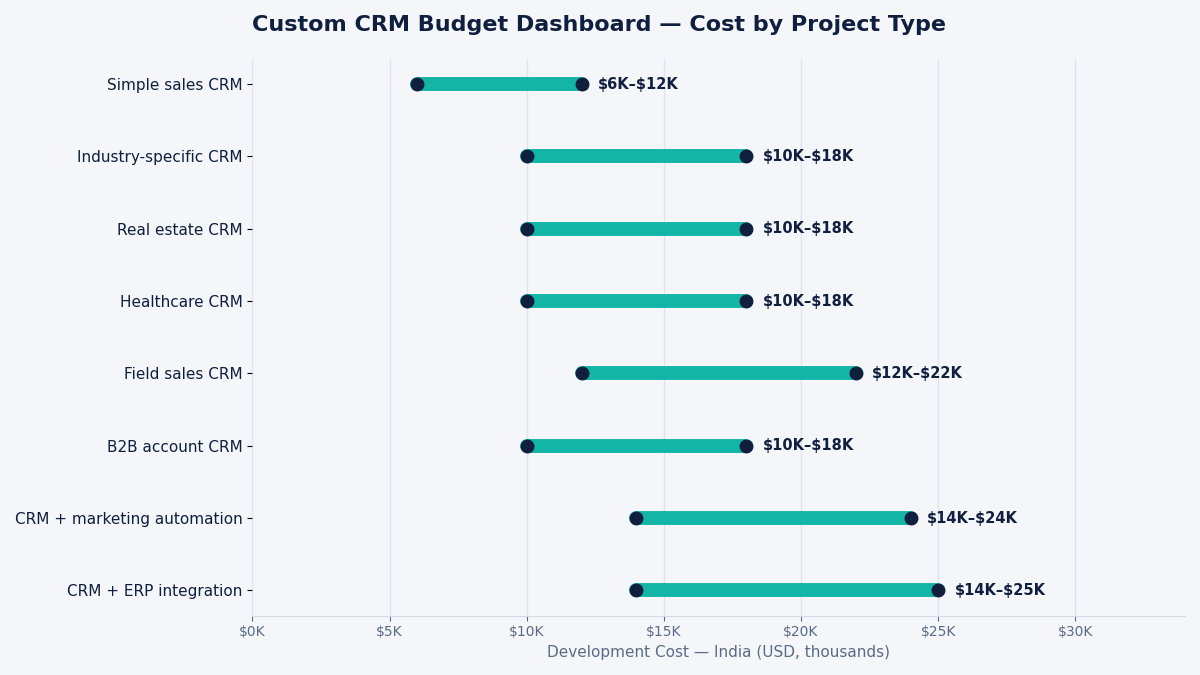
The five core modules of any CRM:
Contact and account management the entity model. Contacts (individuals), accounts (companies), and the relationships between them. For B2B, accounts have multiple contacts and contacts can be associated with multiple accounts. The data model design of how these entities are structured and related determines the system’s flexibility for years.
Pipeline management deals or opportunities moving through stages. Each stage has defined criteria for progression. The pipeline view (Kanban board, list, forecast view) is the primary working interface for sales teams. Custom pipeline stages, custom fields per stage, and custom stage transition rules are the most common customisation requirements.
Activity management logging calls, emails, meetings, notes, and tasks against contacts and accounts. This history is what makes a CRM valuable over time, the accumulated record of every customer interaction. Integration with email clients (Gmail, Outlook) and calendar systems is the most important activity management integration.
Workflow automation triggering actions based on CRM events. When a deal reaches a specific stage, send a notification. When a contact goes 30 days without activity, create a follow-up task. When a deal is won, trigger an onboarding sequence. The automation engine is what transforms a CRM from a database into a workflow tool, and increasingly it’s where teams bring in AI development companies to layer in predictive scoring or smart routing on top of the base rules engine.
Reporting and analytics pipeline health, win/loss rates, deal velocity, sales rep performance, revenue forecasting. The reporting layer should be flexible enough to answer questions that the sales leader has not yet thought of which requires a proper analytics architecture, not hard-coded reports. If you’re weighing how much AI-assisted reporting to build in from day one, our guide on how to choose an AI development company covers what to look for.
How to Evaluate a CRM Development Agency
The domain knowledge question:
Ask the agency to describe the data model they would use for your specific CRM use case. A good CRM developer asks clarifying questions before answering: how many contacts per account, can a contact be associated with multiple accounts, does your pipeline have parallel tracks, what custom fields are required at each stage? The quality of their data model proposal reveals whether they understand CRM architecture or are just building a generic database application.
The integration experience question:
Every CRM connects to other business tools: email, calendar, accounting software, marketing automation, communication tools. Ask specifically what integrations they have built for previous CRM clients and what the most challenging integration was. Gmail/Google Workspace and Outlook/Microsoft 365 calendar integration syncing activities bidirectionally is technically complex and commonly botched. An agency that has done this integration correctly in a previous project is significantly lower risk than one encountering it for the first time in your project; vague answers here are one of the red flags in a software development company we tell clients to watch for.
The scalability question:
A CRM with 100 contacts is a simple application. A CRM with 500,000 contacts, 5 years of activity history, and 20 concurrent users running complex reports is a performance engineering challenge. Ask the agency how they would architect the data layer and query strategy for a CRM that needs to scale to your projected 3-year contact volume. The answer reveals whether they have thought beyond the initial build.
The Hidden Costs of Custom CRM Development
Data migration is the most consistently underestimated cost in CRM projects. If you have existing customer data in a spreadsheet, legacy CRM, or other system, migrating it to the new CRM requires: data cleaning (deduplication, standardising formats), field mapping (old system fields to new system fields), transformation scripts, and validation that migration completeness and accuracy. Budget $1,500 to $5,000 for data migration depending on data volume and source system complexity.
Email integration bidirectional sync between the CRM and Gmail/Outlook so every email is automatically associated with the relevant contact is technically complex and often underpriced. It requires OAuth integration with the email provider, email parsing to extract contact matches, and handling edge cases (emails with multiple contacts, emails from unrecognised addresses). Budget $2,000 to $4,000 for production-quality email integration, and confirm liability for data-handling issues is addressed in your master service agreement.
Training and change management getting your sales team to actually use the CRM is not a development cost but is a project cost. Sales teams resist new tools. Budget time for training documentation, walkthrough videos, and a 30-day adoption support period. The most technically perfect CRM that nobody uses is a failed project; tying final payment to adoption milestones is one reason we recommend structuring milestone payments around outcomes, not just delivery dates.
Frequently Asked Questions
When does it make more sense to build a custom CRM than to use Salesforce or HubSpot?
Custom CRM makes more sense than Salesforce or HubSpot when three conditions are simultaneously true: your process is sufficiently different from standard B2B sales pipelines that CRM configuration cannot represent it accurately, the volume of customisation required in Salesforce would cost more than custom development (common above 20 users with complex requirements), and you have specific data or integration requirements that commercial CRM platforms cannot satisfy without enterprise add-ons at disproportionate cost. For most businesses with standard sales processes and under 30 users, a well-configured HubSpot or Pipedrive at $50 to $100 per user per month outperforms a custom CRM on cost, features, and time-to-value. The custom CRM wins for highly specific industries, regulated environments, and businesses where the CRM is genuinely a competitive differentiator rather than an operational tool.
What is the most important feature to get right in a custom CRM?
The data model, specifically the entity structure and the relationships between entities, is the most important architectural decision in a custom CRM. A CRM with a poorly designed data model becomes increasingly difficult to use as data volumes grow, produces inconsistent reporting because the same information is stored in multiple inconsistent places, and requires expensive re-architecture when the business evolves. The specific decisions that matter most: can a contact belong to multiple accounts simultaneously, how are parent-child account relationships handled, how does the pipeline model map to your actual sales process stages, and how are custom fields versioned when process definitions change over time? An agency that spends significant time on the data model design before any UI development begins is doing the right thing.
How do I migrate data from our existing CRM or spreadsheets to a new custom CRM?
Data migration requires four steps: extraction (pulling data from the source system most CRMs export to CSV; spreadsheets are already in CSV format), transformation (cleaning and reshaping the data to match the new system’s structure deduplicating contacts, standardising phone number formats, mapping old stage names to new stage names), loading (importing the transformed data into the new system, typically via bulk import API or direct database load), and validation (verifying that all records were migrated correctly counts match, critical fields are populated, relationships are intact). For straightforward migrations from a single source with clean data, budget $1,500 to $2,500. For complex migrations from multiple sources, significant deduplication requirements, or large data volumes (100,000+ contacts), budget $3,000 to $6,000.