Best Shopify Development Companies in 2026 What Separates Shopify Experts From Generic Web Developers
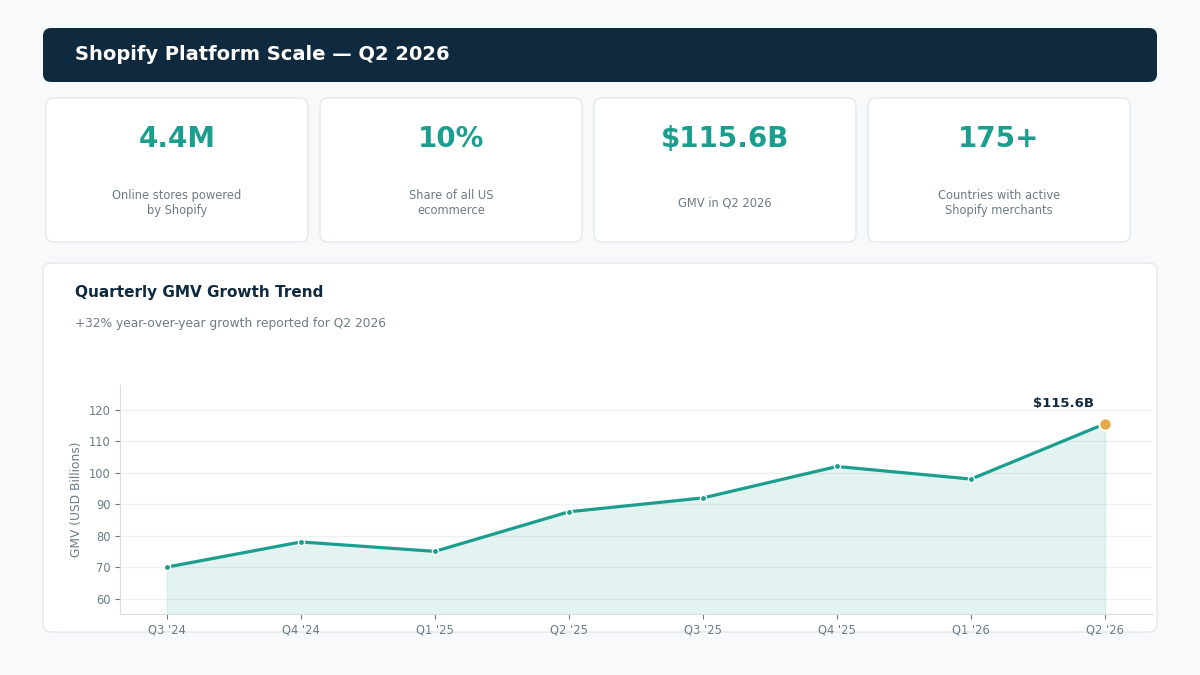
Shopify powers 4.4 million online stores and 10% of all US e-commerce. When a brand outgrows its starter theme and needs custom development a bespoke checkout experience, a custom product configurator, a headless storefront, or a migration from Magento the quality of the Shopify development company they hire determines whether they get a store that converts or a store that looks impressive and loses customers at checkout.
The challenge: every general web developer claims Shopify experience. Most have installed themes and configured apps. A fraction have written production Liquid code, built Shopify apps, or architected complex Shopify Plus stores. Identifying which category an agency belongs to before committing $8,000 to $25,000 to a project is the purpose of this guide.
That’s why choosing the best Shopify development companies requires more than checking whether an agency has Shopify on its service page. You need to evaluate Liquid expertise, custom app development, Shopify Plus experience, integrations, and proven ecommerce results.
Shopify reported $115.6 billion in GMV in Q2 2026, up 32% year over year, while its platform now serves millions of merchants across 175+ countries. This scale makes choosing a genuinely experienced Shopify development partner more important for businesses investing in custom ecommerce solutions.
This guide explains what separates true Shopify experts from generic web developers and what to evaluate before hiring one in 2026.
The Shopify Development Spectrum What Each Level Requires
Shopify development is not one skill it is at least four distinct skills that overlap but do not substitute for each other.
The four Shopify development disciplines:
| Discipline | What It Involves | Who Needs It |
| Theme customisation | Editing an existing Shopify theme colours, fonts, layout, sections | Brands with a standard catalogue wanting a unique look |
| Custom theme development | Building a Shopify theme from scratch in Liquid + JavaScript | Brands wanting a completely bespoke storefront |
| Shopify app development | Building a Shopify app using Node.js or Ruby + Shopify’s APIs | Stores needing custom functionality beyond the app ecosystem |
| Headless Shopify | Shopify as the commerce backend with a custom React/Next.js frontend | Brands with complex UX requirements or multi-channel commerce |
| Shopify Plus customisation | Checkout extensibility, scripts, launchpad, wholesale channel | Enterprise Shopify merchants on Plus tier |
A general web developer can customise an existing theme. Building a custom theme from scratch, developing a Shopify app, or architecting a headless implementation requires specific Shopify expertise that most general developers do not have.
What Good Shopify Development Looks Like The Signals
Portfolio signals specific to Shopify:
Store URLs you can actually visit and shop in not screenshots of stores, actual live stores. Visit them on your mobile phone. A Shopify expert’s stores load in under 3 seconds, have clean mobile navigation, smooth product filtering, and a checkout that works in 3 taps. A general developer’s Shopify work often has subtle friction points, filter panels that are awkward on mobile, checkout loading delays, images that pop in rather than loading cleanly. If you’re unsure what to look for beyond the storefront itself, this guide to vetting a development company’s portfolio breaks down the specific signals that separate a genuine build from a templated one.
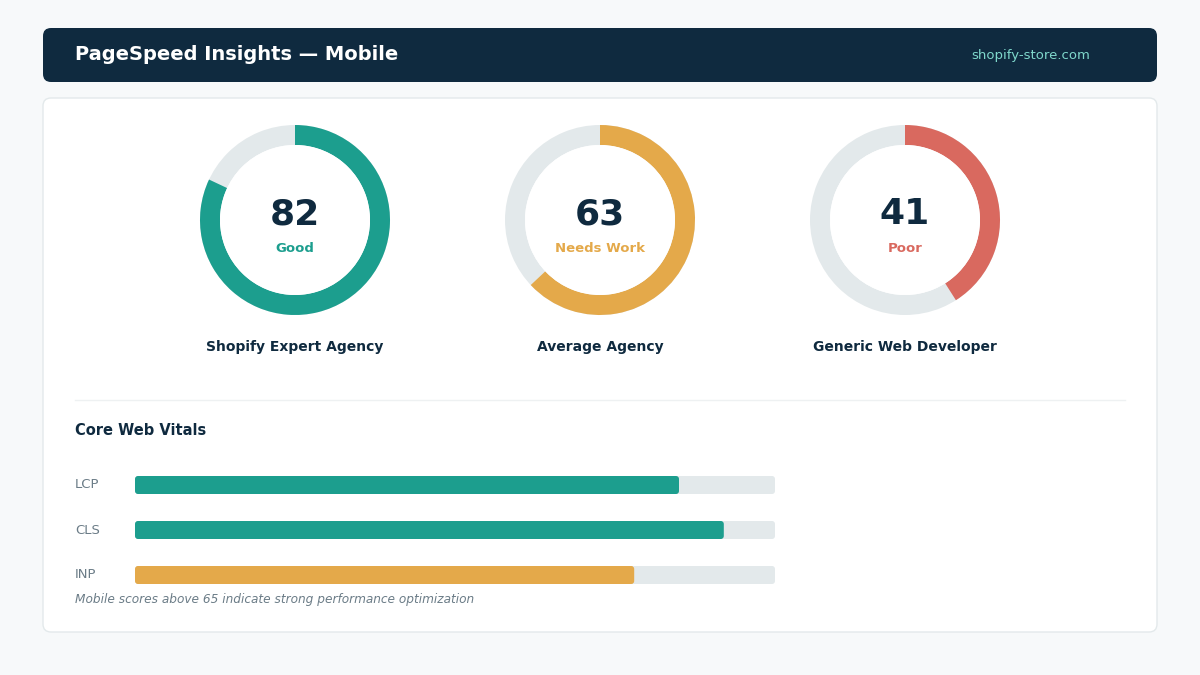
PageSpeed Insights scores run any store from their portfolio through Google’s PageSpeed tool. Mobile scores above 65 indicate competent performance optimization. Scores below 50 indicate an agency that does not prioritise performance. Shopify performance work is a specific discipline: lazy loading images, deferring non-critical JavaScript, optimising the critical rendering path that distinguishes experienced Shopify developers from installers.
Shopify app store listings if they build Shopify apps, do they have apps in the Shopify App Store? An app with reviews and active installations demonstrates that they can build to Shopify’s technical requirements and maintain a production app at scale.
Theme Store partnerships: are they a Shopify Partner or a Shopify Plus Partner? Shopify’s partnership tiers are not just marketing, they require maintaining client satisfaction scores and completing certifications that confirm technical competence. Agencies that skip these credentials, or can’t produce them on request, are often showing the same warning signs covered in this breakdown of red flags to watch for in a software development company.
Shopify Development Cost at $5K–$30K
Cost by project type with experienced Shopify development agencies:
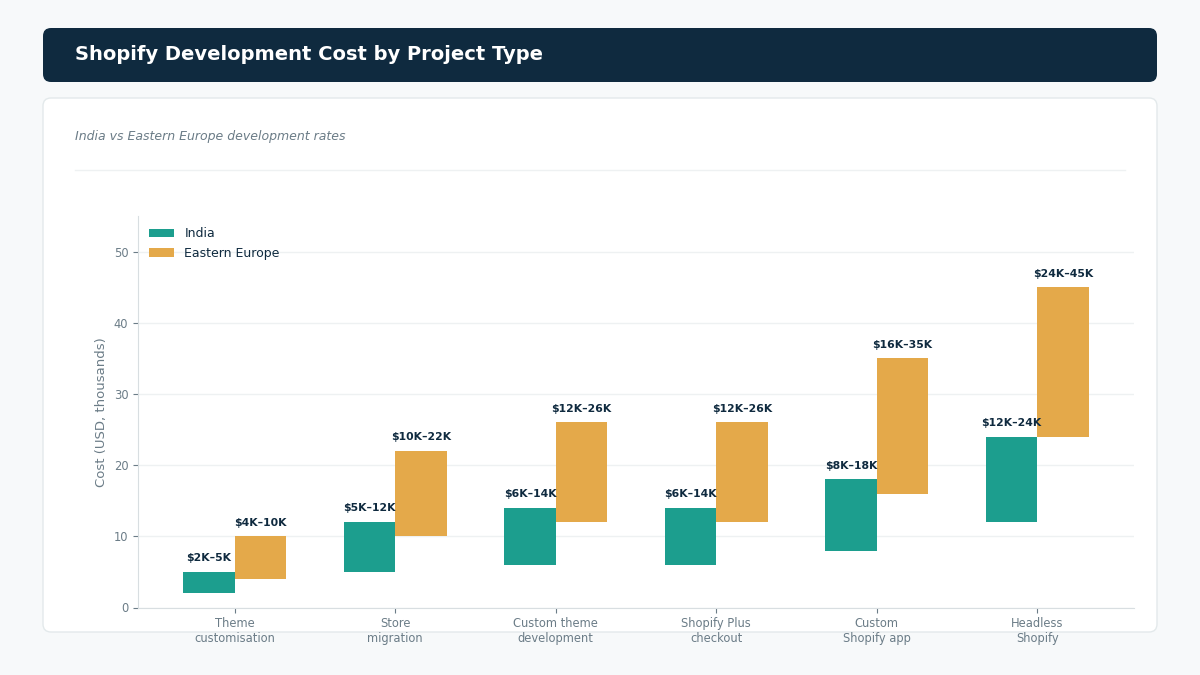
| Project Type | What Is Included | India Cost | Eastern Europe Cost | Timeline |
| Theme customisation (existing theme) | Custom colour scheme, typography, modified layout sections, mobile optimisation | $2K–$5K | $4K–$10K | 3–6 weeks |
| Custom theme development | Full Liquid theme from scratch, all page templates, mobile-first | $6K–$14K | $12K–$26K | 8–14 weeks |
| Shopify store migration (Magento/WooCommerce) | Data migration, redirects, theme setup, payment and app configuration | $5K–$12K | $10K–$22K | 6–12 weeks |
| Custom Shopify app (public or private) | Node.js app, Shopify API integration, app embed, admin UI | $8K–$18K | $16K–$35K | 10–18 weeks |
| Shopify Plus custom checkout | Checkout extensibility (UI extensions, functions), custom checkout flow | $6K–$14K | $12K–$26K | 8–14 weeks |
| Headless Shopify (Next.js frontend) | Custom React/Next.js storefront + Shopify Storefront API | $12K–$24K | $24K–$45K | 14–22 weeks |
| Subscription integration | Recharge or custom subscription, recurring billing, customer portal | $4K–$10K | $8K–$18K | 5–10 weeks |
| B2B / Wholesale configuration | Shopify B2B features + custom pricing + bulk ordering | $5K–$12K | $10K–$22K | 6–12 weeks |
The Shopify vs Shopify Plus Decision
Most of the $5K to $30K Shopify development market operates on Shopify’s standard plans ($29 to $299/month). Shopify Plus ($2,300/month) is relevant when you need capabilities that standard Shopify does not support.
When Shopify Plus justifies the cost:
Checkout extensibility: the ability to customise the checkout beyond what standard Shopify allows. Adding custom fields, custom upsells, custom logic based on cart contents. Shopify Plus provides this through checkout UI extensions and Shopify Functions. Scripts automating complex discount and pricing logic that would otherwise require a Shopify app.
Expansion stores multiple storefronts (different languages, different markets, different brands) managed from one Plus account. Launchpad scheduling flash sales, price changes, and theme changes automatically.
Wholesale channel a separate B2B ordering channel with custom pricing without building a custom application. Weighing this list against your actual roadmap is a lot like the exercise of matching your engagement model to your project’s real requirements instead of defaulting to whichever option sounds more “enterprise.”
For stores under $500K annual revenue, Shopify Plus pricing ($27,600/year) is rarely justified. The standard plans with well-chosen apps cover most requirements at a fraction of the cost. This mirrors a pattern seen across software budgeting: generally premium infrastructure tiers only pay off once usage or scale crosses a specific threshold, and paying for headroom you won’t use for years rarely improves outcomes.
Questions That Reveal Genuine Shopify Expertise
Ask them to explain the difference between Shopify’s Online Store 2.0 section schema and the legacy theme architecture. A genuine Shopify developer understands the implications of OS 2.0 JSON templates, app blocks, native section support and why it matters for long-term theme maintainability. A generic web developer will not know what you are asking about.
Ask how they handle performance optimization for a Shopify store with 50+ product images on the collection page. A Shopify expert discusses: lazy loading, Shopify’s image API for responsive sizing, deferring app pixel loading, Core Web Vitals prioritisation, and the specific JavaScript execution model that makes Shopify stores slow without careful optimisation. A generic developer discusses image compression and caching generically. The gap between a specific, mechanism-level answer and a generic one is often the clearest signal in a structured framework for comparing software development companies’ vague answers to specific questions are themselves the data point.
Ask what the Shopify Storefront API is and when you would use it versus the Admin API. A Shopify expert explains: the Storefront API is the headless commerce API that allows a custom frontend to query products, collections, and cart operations; the Admin API is for backend operations managing orders, products, and customers. Confusing these two indicates no headless Shopify experience.
The Shopify App Ecosystem What Apps Cost and When to Build Custom
Most Shopify store requirements can be met with apps rather than custom development. Understanding this boundary saves money and time.
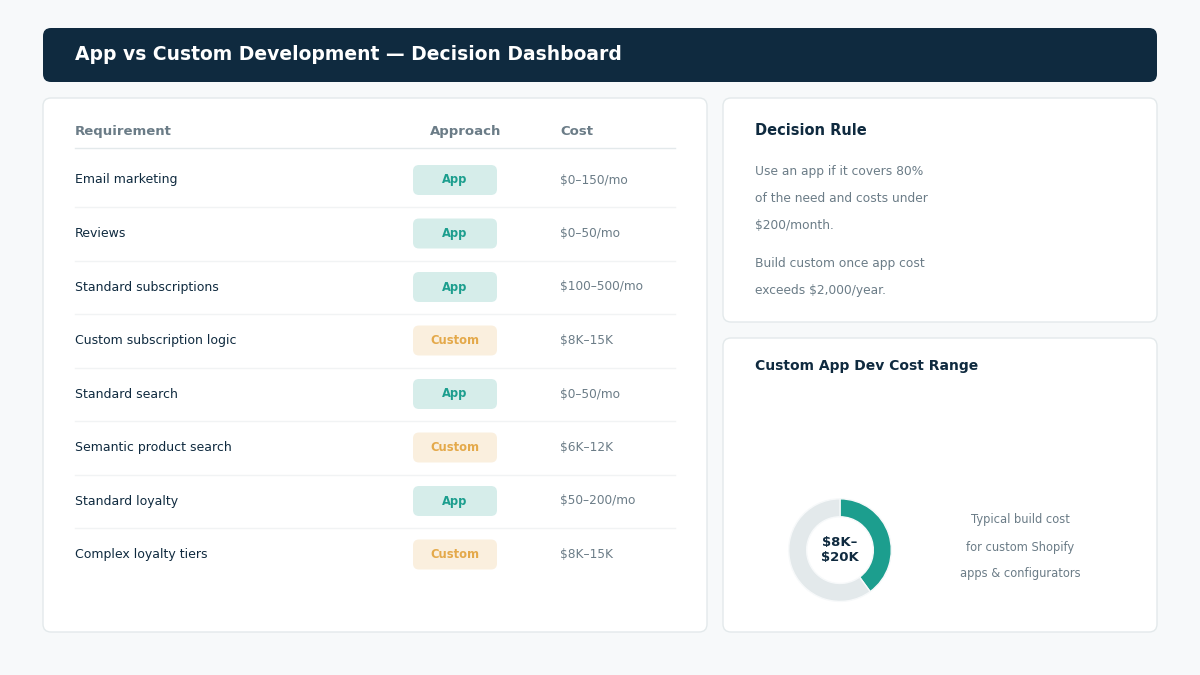
App vs custom development decision:
| Requirement | Best Approach | Typical Cost |
| Email marketing | Klaviyo / Omnisend app | $0–$150/month |
| Reviews | Judge.me / Yotpo app | $0–$50/month |
| Subscriptions | Recharge / Bold app (standard) | $100–$500/month |
| Custom subscription logic | Custom Shopify app | $8K–$15K development |
| Standard search | Shopify’s built-in or Searchanise app | $0–$50/month |
| Semantic product search | Custom app with vector search | $6K–$12K development |
| Standard loyalty | Smile.io / LoyaltyLion | $50–$200/month |
| Complex loyalty (custom tiers) | Custom Shopify app | $8K–$15K development |
| Standard product bundles | Bundle Builder app | $0–$50/month |
| Complex configurator | Custom app | $10K–$20K development |
The decision rule: if an app exists that meets 80% of your requirement and costs under $200/month, use the app. If the requirement is sufficiently unique that no app meets it, or if the app cost at your expected scale exceeds $2,000/year, custom development becomes cost-effective. It’s the same build-vs-buy math that applies to deciding between a custom build and a template-based solution; the right call depends entirely on how far your requirements diverge from what the off-the-shelf option already covers.
Frequently Asked Questions
What is Liquid and why does Shopify expertise require knowing it?
Liquid is Shopify’s proprietary templating language, the code that tells Shopify how to render its HTML. Every page template, every section, every snippet in a Shopify theme is written in Liquid. A developer who cannot write Liquid cannot build or meaningfully customise Shopify themes. They can change CSS (colours, fonts, spacing) and configure sections through the theme editor, but any structural customisation changing the layout of a product page, building a custom section type, modifying how collections display requires Liquid knowledge. When evaluating a Shopify development agency, ask specifically: does the developer who will work on my project write Liquid code? The answer to this question distinguishes genuine Shopify developers from general web developers who configure Shopify stores.
What is the difference between a Shopify theme and a Shopify app?
A Shopify theme is the visual layer of a Shopify store, the design, layout, and presentation of every page (home, collection, product, cart, checkout). Themes are built in Liquid, CSS, and JavaScript and live within the Shopify storefront. A Shopify app is an external application that integrates with Shopify through its APIs to add functionality that themes cannot provide a custom loyalty programme, a product configurator, a shipping rule engine, or an inventory sync tool. Apps are built as Node.js or Ruby applications hosted outside Shopify, communicating with the store through the Shopify Admin API or Storefront API. Most store customisation needs are met by a combination of theme development and app installation. Custom app development is required when no existing app meets the requirement and the functionality is too complex or unique for theme-level implementation.
How do I migrate from WooCommerce or Magento to Shopify without losing SEO rankings?
A proper Shopify migration preserves SEO through four steps: URL mapping (every old URL is mapped to its equivalent new Shopify URL, with 301 redirects implemented for any URLs that change structure), metadata migration (all page titles, meta descriptions, and image alt tags are carried over), content structure preservation (the same category and product hierarchy is replicated in Shopify’s collection and product structure), and Google Search Console verification (after launch, fetch all pages in GSC and monitor for 404 errors or traffic drops). The most common SEO damage in Shopify migrations comes from implementing redirects incorrectly or missing them for a subset of URLs. A competent Shopify migration agency creates a complete URL map before development and tests every redirect before launch.