SaaS Development Cost in 2026 What Your Budget Actually Builds
Building a SaaS product is the most common reason software development agencies get hired by founders in 2026. The appeal is obvious recurring revenue, scalable distribution, no marginal cost per customer. The economics are compelling. The technical complexity is consistently underestimated.
A SaaS product is not a web application with a subscription. It is a web application with a subscription billing engine, multi-tenant data architecture, user role management, an onboarding flow designed to convert free users to paid, usage analytics, and the infrastructure to run reliably at multiple concurrent customer organisations simultaneously. Each of these components adds development time and cost that buyers frequently miss when budgeting.
That’s why understanding SaaS development cost early is essential for deciding what your budget can realistically build in 2026.
According to Grand View Research – SaaS Market Report, the global SaaS market is projected to reach $530 billion in 2026, up from $464.7 billion in 2025, with an expected CAGR of 11.1% through 2033.
The global SaaS market is valued at $310 billion in 2026. At the $5K to $30K budget level, the most common SaaS builds are: vertical SaaS for specific industries or use cases, internal tooling SaaS, B2B workflow automation platforms, and niche productivity tools. This guide covers what your budget realistically builds and where the hidden costs are.
What Makes SaaS Development More Expensive Than a Regular Web App
The same feature set costs 30 to 50% more to build as a SaaS application than as a single-tenant web application. The premium comes from the architectural requirements that define SaaS.
The SaaS-specific components that add cost:
| Component | What It Is | Why It Adds Cost |
| Multi-tenancy | Multiple customer organisations on the same infrastructure with complete data isolation | Requires data model design, access control architecture, and row-level security across every query |
| Subscription billing engine | Recurring billing, plan upgrades/downgrades, proration, trial periods, dunning | Complex state machine billing is one of the most error-prone modules to build correctly |
| User and organisation management | Companies as accounts, multiple users per company, role-based permissions | Hierarchical permission model across every feature |
| Onboarding flow | First-run experience that gets new users to value quickly | Product design and engineering effort the most important conversion factor |
| Usage analytics | What features are being used, by whom, how often | Event tracking infrastructure + analytics dashboard |
| Plan-based feature gating | Different features available at different subscription tiers | Feature flag system that is consistent and maintainable |
| Customer self-service | Users can upgrade, downgrade, add users, manage billing without contacting support | Billing portal integration (Stripe Customer Portal) + user management flows |
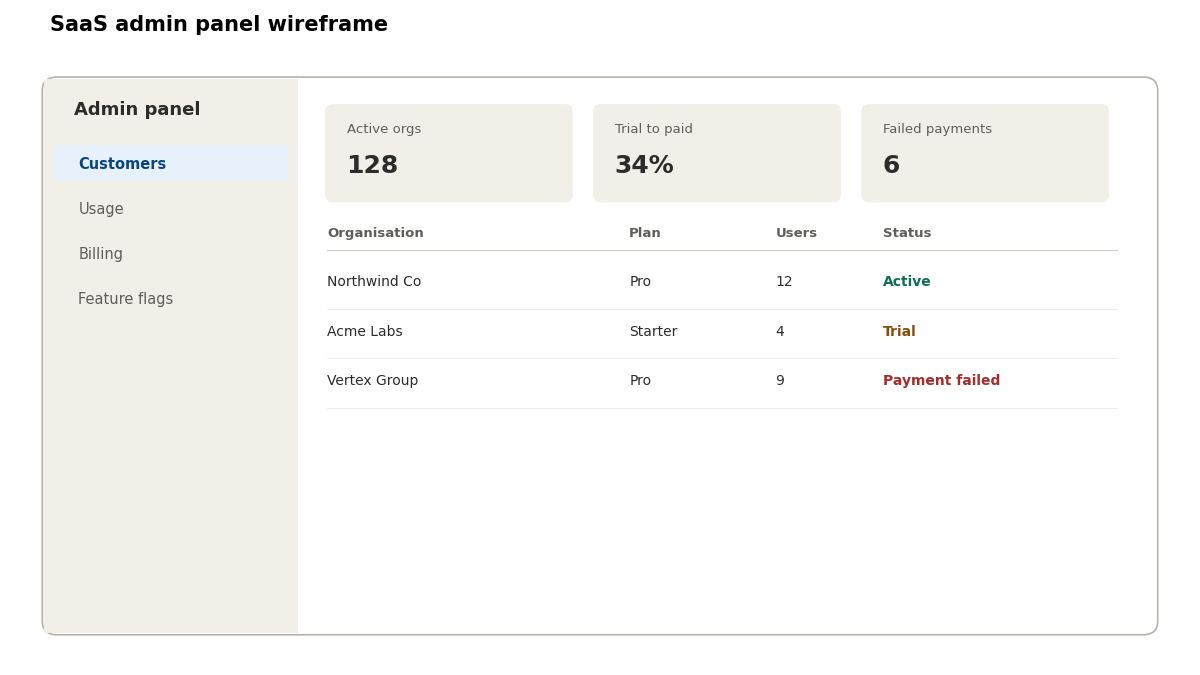
| Admin panel | You need to see all customers, their usage, their billing status, and manage the product | Separate from the main app often underestimated |
SaaS Development Cost by Type
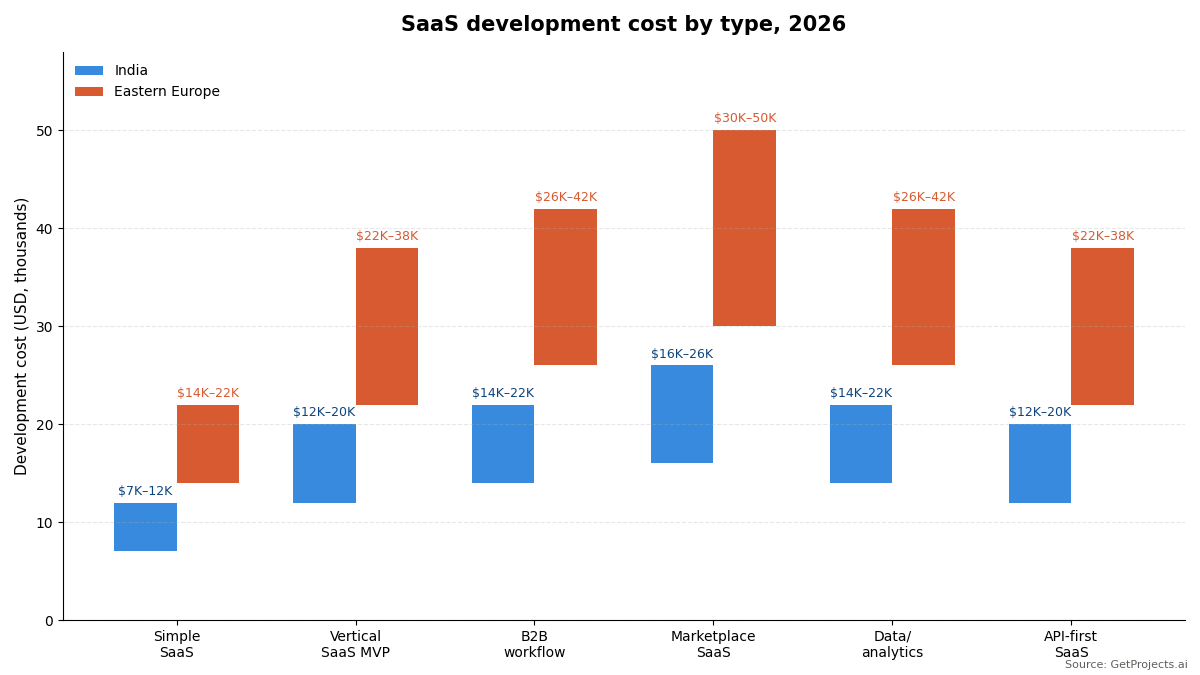
Cost ranges for the most common SaaS categories built with a strong Indian development team:
| SaaS Type | Core Features | India Cost | Eastern Europe Cost | Timeline |
| Simple single-feature SaaS | One core workflow, user auth, basic subscription (Stripe), data storage | $7K–$12K | $14K–$22K | 10–16 weeks |
| Vertical SaaS MVP | Industry-specific workflows, multi-user per organisation, subscription tiers, basic reporting | $12K–$20K | $22K–$38K | 16–24 weeks |
| B2B workflow automation | Multi-step workflows, integrations with 3–4 business tools, role management, audit trail | $14K–$22K | $26K–$42K | 18–26 weeks |
| SaaS with marketplace element | Multiple user types (creator + consumer), transaction engine, content management | $16K–$26K | $30K–$50K | 20–30 weeks |
| Data/analytics SaaS | Multi-source data ingestion, dashboards, custom reports, export | $14K–$22K | $26K–$42K | 18–26 weeks |
| API-first SaaS | Developer-facing product API, documentation, SDK, developer portal, usage tracking | $12K–$20K | $22K–$38K | 16–24 weeks |
What $5K, $10K, $20K, and $30K Realistically Builds as a SaaS
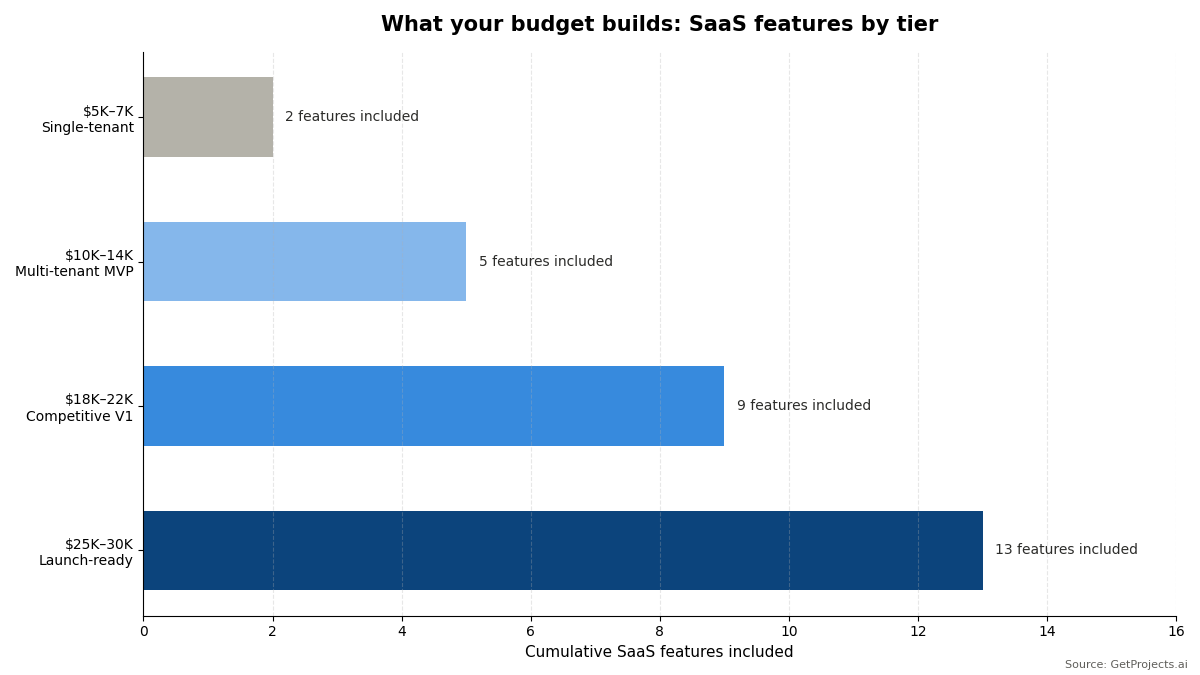
$5,000–$7,000:
A single-tenant web application with a subscription payment integration. Not true SaaS no multi-tenancy, no organisation management but a functional, launchable product that a defined set of users can pay for and use. Appropriate for very early validate your startup idea stage work: “Will anyone pay for this?” does not require full multi-tenant architecture. If you get paying users, you can invest in proper SaaS architecture in Phase 2.
$10,000–$14,000:
A true multi-tenant SaaS MVP organisations as accounts, multiple users per organisation, basic role management (admin vs standard user), a core workflow that provides real value, Stripe subscription integration with one or two pricing tiers, and a basic admin panel. This is a deployable V1 that can onboard paying customers. What it does not have: sophisticated onboarding, advanced analytics, feature gating by plan tier, or production-grade error handling.
$18,000–$22,000:
A genuinely competitive SaaS V1 everything in the $10K–$14K tier plus a thoughtful onboarding flow, usage analytics, plan-based feature gating, Stripe Customer Portal for self-service billing management, basic in-app notifications, and a complete admin panel with customer management. At this budget, where you build matters as much as what you build. Our breakdown of India vs Eastern Europe vs LatAm shows how team location shifts both cost and delivery speed at this tier. This is the budget range where you can build something you would not be embarrassed to show a sophisticated SaaS buyer.
$25,000–$30,000:
A launch-ready SaaS product that competes in its category. Polished onboarding, comprehensive feature set, integration with 3 to 4 essential business tools (Slack, email, CRM), in-app help and documentation, comprehensive error handling, performance optimisation, and 60 days of post-launch support. At this budget with an Indian team, you are building a product that would cost $150,000 to $200,000 with a US agency for a full sense of how far this stretches, see our software development cost by country guide.
The Multi-Tenancy Decision Why It Matters for Your Budget
Multi-tenancy is the architectural pattern that allows multiple customer organisations to use the same SaaS infrastructure with complete data isolation. Getting this architecture right from the start is significantly cheaper than retrofitting it later.
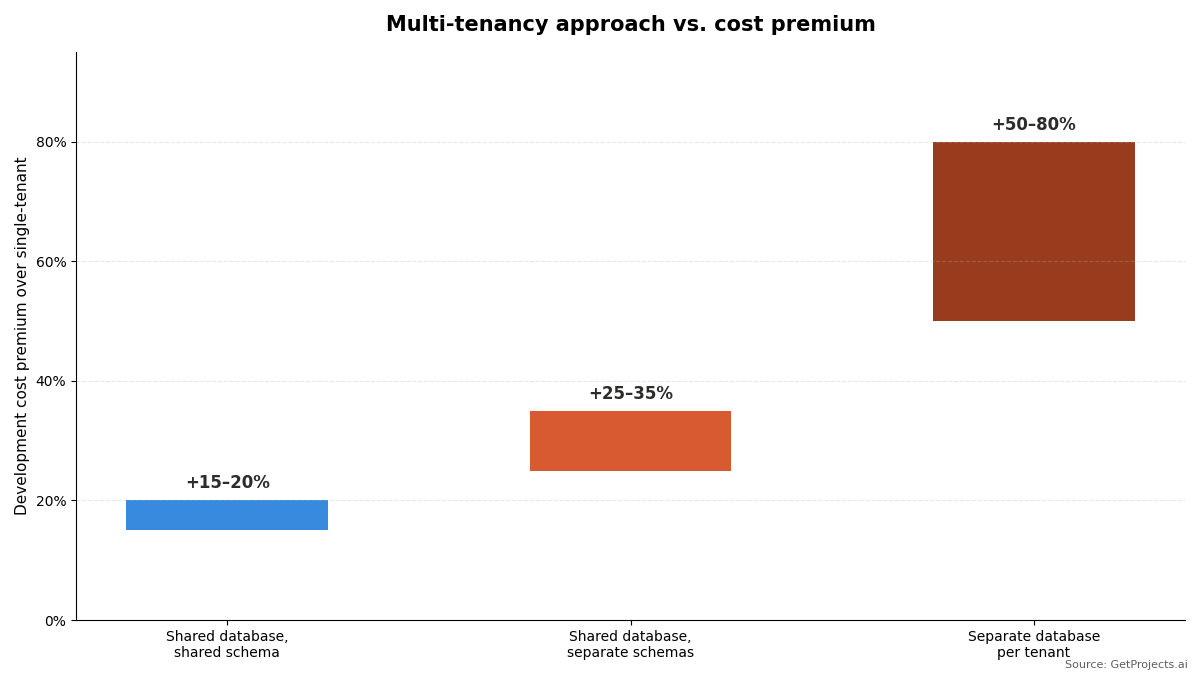
The three multi-tenancy approaches and their cost implications:
| Approach | Description | Development Cost Premium | When to Use |
| Shared database, shared schema | All tenants in the same tables, row-level security separates their data | +15–20% over single-tenant | Most SaaS cost efficient, manageable at most scales |
| Shared database, separate schemas | Each tenant has their own schema within a shared database | +25–35% over single-tenant | When tenants need more isolation but not separate infrastructure |
| Separate database per tenant | Each tenant has their own database instance | +50–80% over single-tenant | Enterprise SaaS with data residency requirements |
For a $5K to $30K SaaS build, a shared database with row-level security is almost always the right choice. It provides adequate isolation for most SaaS use cases, is straightforward to implement correctly with tools like Row Level Security in PostgreSQL or Supabase, and does not require infrastructure orchestration complexity that separate databases introduce.
The most expensive multi-tenancy mistake is starting a single-tenant and trying to retrofit multi-tenancy after you have customers. Every query must be reviewed, every API endpoint must be updated, and every piece of stored data must be migrated. This retrofit typically costs as much as the cost of custom software development from scratch effectively rebuilding the application you already paid to build once.
The Subscription Billing Layer What It Actually Costs to Build Correctly
Most SaaS builders underestimate subscription billing complexity. The happy path customer subscribes, pays monthly, cancels when they want to is straightforward. The real complexity lives in edge cases that most agencies underestimate.
The billing edge cases that trip every SaaS builder:
| Scenario | What Must Happen | Complexity |
| Mid-cycle upgrade | Customer upgrades from Starter to Pro on the 15th of a 30-day cycle | Proration calculation they pay for 15 days of Pro minus 15 days of Starter already paid |
| Failed payment | Customer’s card declines on renewal | Dunning email sequence, retry logic, grace period, downgrade to free on payment failure |
| Annual to monthly switch | Customer wants to change billing cadence | Credit calculation, new cycle start, proration |
| Adding a seat | Customer adds a user mid-cycle in per-seat pricing | Prorate the new seat cost, add to next invoice |
| Free trial to paid | Trial expires, customer either upgrades or loses access | Automated trial expiry, card collection, subscription activation |
| Enterprise annual upfront | Customer pays $12,000 upfront for annual | Deferred revenue recognition, pro-rating for mid-year changes |
The practical answer: use Stripe Billing for subscription management not because you cannot build this logic yourself, but because Stripe has already solved all of these edge cases at production scale and provides a webhook system that makes development straightforward. An agency that proposes building a custom subscription billing engine for a $10,000 SaaS project is creating complexity that will take more time than Stripe integration and will have more edge case failures. It’s one of the red flags in a software development company worth watching before you sign off on scope.
The Hidden Costs Specific to SaaS Products
Infrastructure for multi-tenant production:
A multi-tenant SaaS application needs more infrastructure than a single-tenant application. Database connection pooling (PgBouncer), separate staging environment, background job processing (for async tasks like email sending and report generation), object storage for user uploads. Budget $150 to $400 per month for a properly configured production SaaS infrastructure.
Email and communication services:
Every SaaS application needs transactional email welcome emails, password resets, billing receipts, usage notifications. Transactional email services (SendGrid, Postmark, AWS SES) charge per email sent, typically $0.001 to $0.002 per email. At 10,000 users sending 5 emails each per month, this is $50 to $100 per month. It’s a small line item, but it’s one of several ongoing infrastructure costs for startups that founders forget to budget past launch, not budget-breaking, but not zero.
Customer support infrastructure:
Your SaaS will generate support requests. Budget for a basic help desk (Intercom or Crisp cost $39 to $100 per month), an in-app help widget, and basic documentation. The development cost for integrating a live chat widget is $500 to $1,500 and where that build happens matters, since developer hourly rates by country can shift that number significantly. The ongoing subscription cost is the real expense.
Frequently Asked Questions
What is multi-tenancy in SaaS and do I need it for a $10,000 MVP?
Multi-tenancy is the architectural pattern that allows multiple customer organisations to use the same SaaS application simultaneously with complete data isolation. Organisation A cannot see Organisation B’s data even though they run on the same infrastructure. For a true B2B SaaS where each customer is a company with multiple users, multi-tenancy is required from day one retrofitting it later is more expensive than building it correctly initially. For a B2C SaaS where each customer is an individual user rather than an organisation, standard single-user authentication is sufficient and multi-tenancy is not required. At a $10,000 budget, a shared database with row-level security multi-tenancy is achievable and should be built if your product serves organisations as customers.
Should I use Stripe for SaaS billing or build a custom billing system?
Use Stripe. Stripe Billing handles every subscription scenario your SaaS will encounter, trials, upgrades, downgrades, proration, dunning, annual plans, per-seat pricing, usage-based billing. The integration cost is lower than building equivalent functionality from scratch, and Stripe’s webhook system makes the development straightforward. The cases where custom billing makes sense are: very high volume where Stripe’s per-transaction fees become significant (above $1M MRR), highly specialised billing models that Stripe does not support (certain usage-based pricing structures), or markets where Stripe is not available. For a $5K to $30K SaaS MVP, there is no scenario where a custom billing system is a better investment than Stripe integration.
How much does it cost to build a SaaS admin panel?
A comprehensive admin panel the interface you use to manage customers, view usage, handle support issues, and configure the product typically costs $4,000 to $8,000 to build as part of a SaaS project. It is often underestimated because founders focus on the customer-facing features and think of the admin panel as a simple backend view. In practice, a useful admin panel includes: user and organisation management, subscription and billing status, usage analytics, feature flag controls, impersonation (the ability to view the product as a specific customer for support purposes), and export functionality. Many SaaS founders discover they need this after launch and face a $3,000 to $6,000 unbudgeted build. Include it in your initial scope.
What is a SaaS MVP and what is the minimum it needs to include?
A SaaS MVP needs three things to be commercially viable: the core feature that creates the value proposition, the one thing that makes people pay, user authentication with organisation/account management so multiple users at a customer company can log in, and subscription billing so you can actually collect revenue. Everything else onboarding flows, analytics, integrations, advanced features is Phase 2. The most common SaaS MVP mistake is building everything except the core value proposition well. Five polished peripheral features are less valuable than one core feature that solves the buyer’s problem so completely that they would pay for it immediately. Build the smallest possible version of the thing people will pay for, ship it, and add everything else based on what real customers ask for.