Mobile App Development Cost in 2026 What You Actually Pay and What You Get
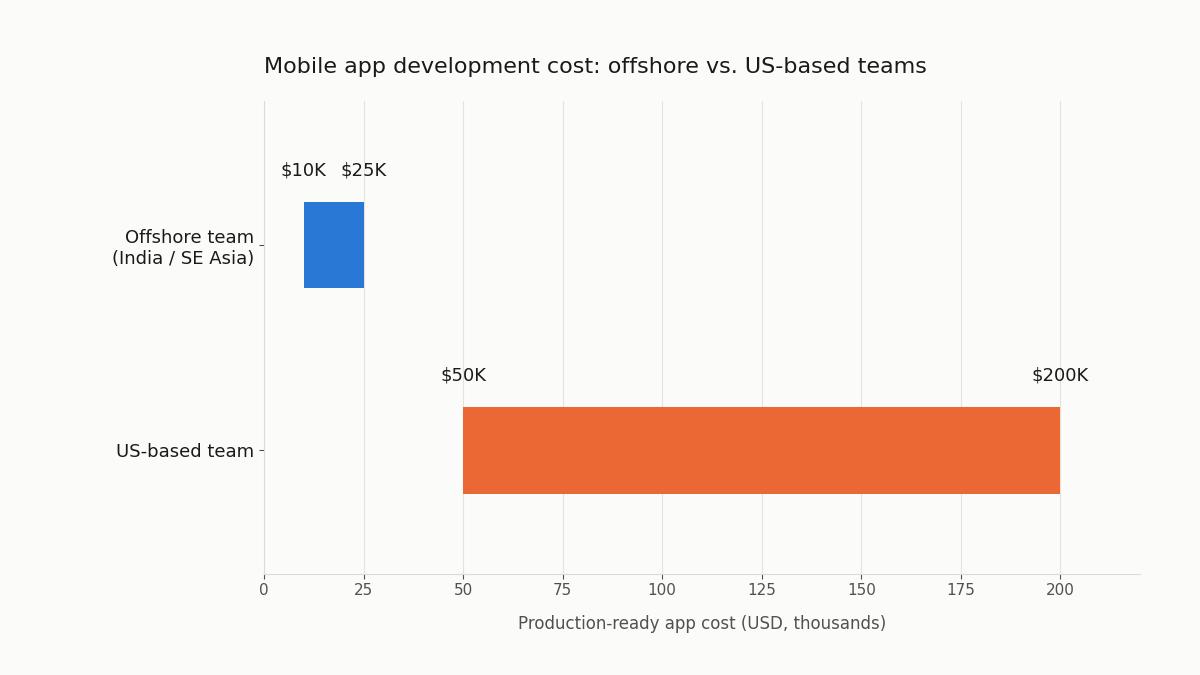
“How much does it cost to build an app?” is the question every first-time app builder asks. The honest answer is that a functional mobile app starts at around $5,000 and a production-ready consumer app with real features costs $10,000 to $25,000 when built by a strong offshore team. Those same apps cost $50,000 to $200,000 with US-based development. The gap is not quality, it is geography.
That’s why understanding mobile app development cost early helps you avoid overspending or underbuilding your product.
According to Statista, global mobile app revenues are projected to exceed $673 billion in 2026, reflecting massive demand across industries. But within this growing market, app development costs follow clearer patterns based on complexity and geography.
The global mobile app development market is valued at $228 billion in 2026. Every category of business retail, healthcare, logistics, education, finance is building mobile applications. The challenge for the $5K to $30K buyer is understanding what their budget realistically builds, where to find the teams that can build it, and what the hidden costs are that most agency quotes do not mention.
This guide gives you the real numbers.
What Factors Determine Mobile App Development Cost
Six variables determine what you pay. Understanding each one helps you make the trade-offs that stretch your budget without sacrificing the things that matter.
The six cost drivers:
| Factor | Lower Cost | Higher Cost |
| Platform | Single platform (iOS or Android) | Both platforms simultaneously |
| Framework | Cross-platform (Flutter, React Native) | Native (separate iOS and Android codebases) |
| Design complexity | Standard component library | Custom design system, complex animations |
| Features | Simple CRUD + auth + 1 integration | Real-time features, complex logic, 5+ integrations |
| Backend complexity | Simple REST API + database | Real-time, microservices, complex data processing |
| Geography | India or Southeast Asia | US or Western Europe |
The platform decision:
Building for iOS only or Android only cuts development cost by 30 to 40% compared to building both simultaneously. If you are testing a product hypothesis on a limited budget, launching on one platform first is a legitimate strategic choice. The same logic applies whether you’re comparing software development companies for a native build or evaluating a B2B marketplace like GetProjects to find the right team. iOS-only makes sense if your target audience skews higher-income (iOS users spend 2× more on apps than Android users). Android-only makes sense if your target is emerging markets or price-sensitive consumers.
The framework decision:
Cross-platform frameworks Flutter and React Native allow a single codebase to deploy on both iOS and Android. This is the standard choice for $5K to $30K projects, similar in principle to how construction management software projects choose their tech stack based on project scope and budget tier. The performance trade-off is minimal for most business applications. The exceptions where native development is worth the premium: apps with intensive graphics rendering, apps that need deep hardware integration, or apps where performance benchmarks are critical to the user experience.
Mobile App Development Cost by App Type
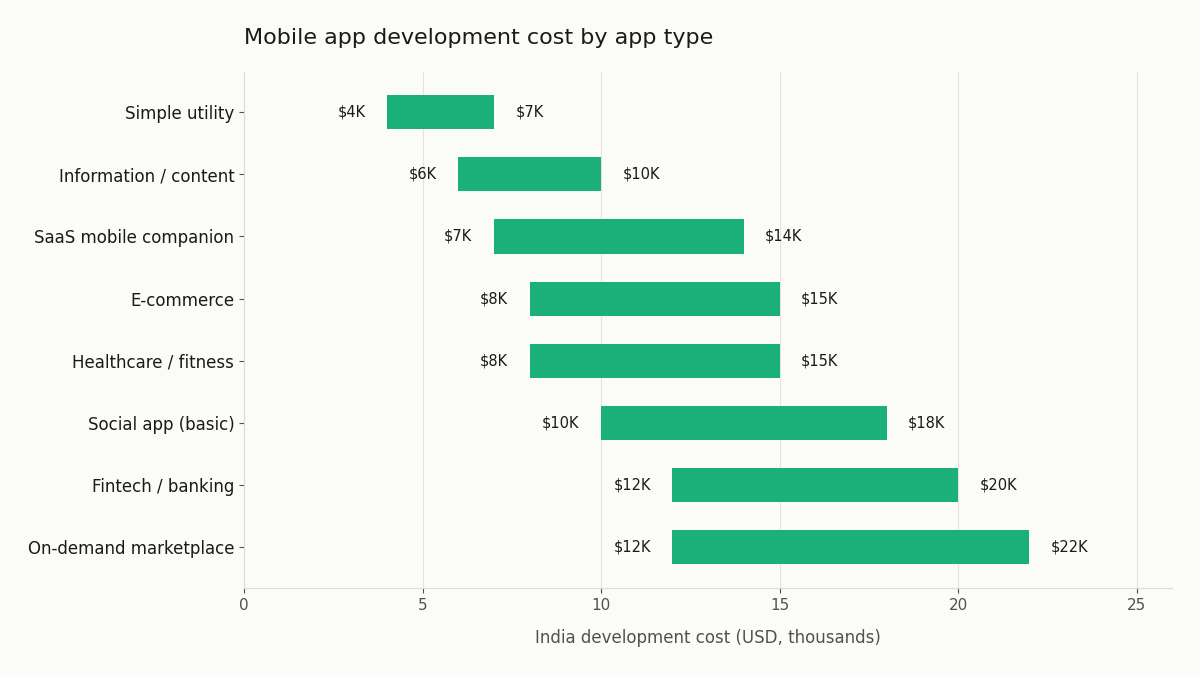
Cost ranges for the most common mobile app categories, built with Flutter or React Native by a strong Indian development team:
| App Type | Core Features | India Cost | Eastern Europe Cost | Timeline |
| Simple utility app | 5–8 screens, basic logic, no backend | $4K–$7K | $8K–$14K | 6–10 weeks |
| Information / content app | Content display, search, favourites, push notifications | $6K–$10K | $12K–$20K | 8–14 weeks |
| Social app (basic) | User profiles, posts, follows, feed, basic messaging | $10K–$18K | $20K–$35K | 14–22 weeks |
| E-commerce app | Product catalogue, cart, checkout (Stripe), order tracking | $8K–$15K | $16K–$28K | 12–18 weeks |
| On-demand / marketplace | Two user types, booking flow, payment, real-time tracking | $12K–$22K | $22K–$40K | 16–24 weeks |
| Healthcare / fitness app | Health tracking, user auth, data visualisation, reminders | $8K–$15K | $16K–$28K | 12–18 weeks |
| Fintech / banking app | Secure auth, transaction history, payment integration | $12K–$20K | $22K–$38K | 14–22 weeks |
| SaaS mobile companion | Companion to web product, limited offline, push notifications | $7K–$14K | $14K–$25K | 10–16 weeks |
What $5K, $10K, $20K, and $30K Actually Builds
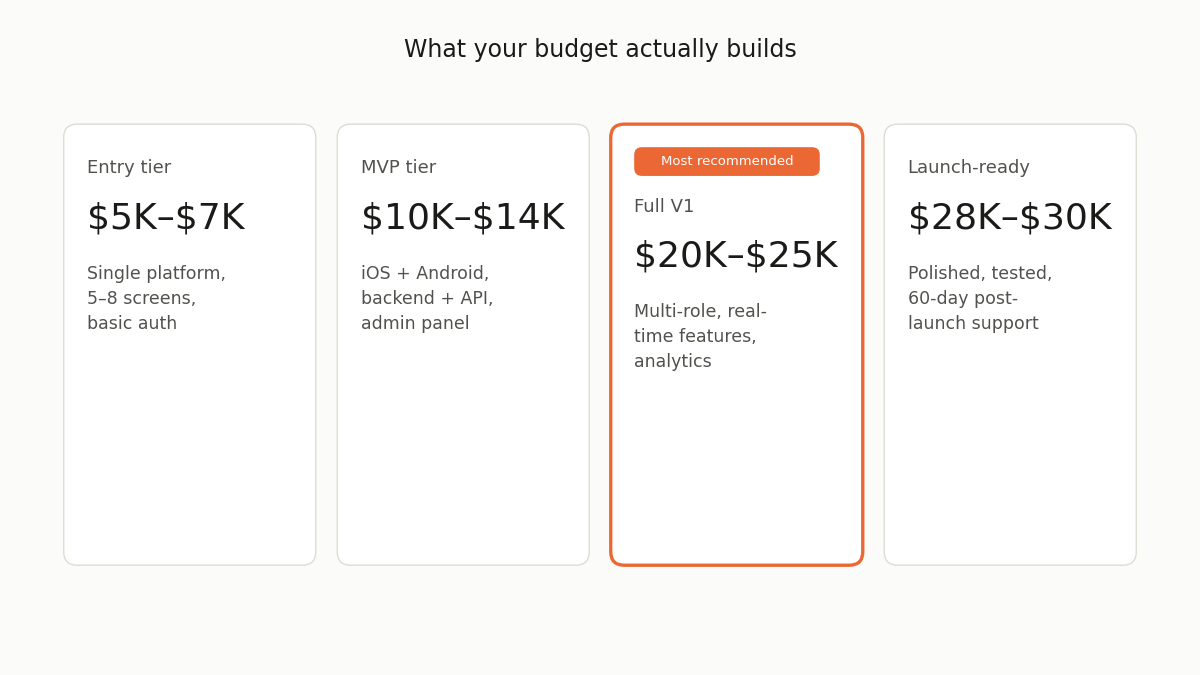
$5,000–$7,000:
A simple, single-platform app with 5 to 8 screens, basic user authentication, straightforward data display, and one external API integration. Think a simple directory app, a basic booking form, or a companion app to an existing service. This budget gets you to a functional, deployable product not a polished consumer app, but something a defined user group can use to complete a specific task.
What it does not get you: custom design (you will use a standard component library), complex backend logic, real-time features, or a second platform.
$10,000–$14,000:
A cross-platform app (iOS + Android from one Flutter codebase) with 10 to 15 screens, user authentication, a proper backend API with database, 2 to 3 external integrations, push notifications, and a basic admin panel. This is a genuine MVP something you can launch, show to users, and iterate on, provided you know how to select the right MVP development company first.
At this budget with an Indian team see the best software development companies in India for reference points you should expect professional-quality UI built on a standard design system, and a codebase future developers can build on, which is exactly what this buyer framework for comparing software companies helps you vet for. What it does not get you: real-time features (live updates, chat, geolocation tracking), complex business logic with many edge cases, or consumer-grade polish on animations and transitions.
$20,000–$25,000:
A fully featured V1 product. Multiple user roles, complex workflows, 4 to 5 integrations, basic real-time features, performance optimised for launch, comprehensive error handling, analytics integration (Mixpanel or equivalent), and a complete admin panel with user management. This is the budget where you can build something genuinely competitive in its category not just functional but well-designed and well-engineered.
$28,000–$30,000:
A launch-ready consumer or B2B app with everything a V1 needs: polished design, comprehensive feature set, security-hardened backend, scalable infrastructure setup, automated testing on critical flows, App Store and Play Store optimised assets, and a post-launch support agreement for the first 60 days.
The Hidden Costs That Blow Mobile App Budgets
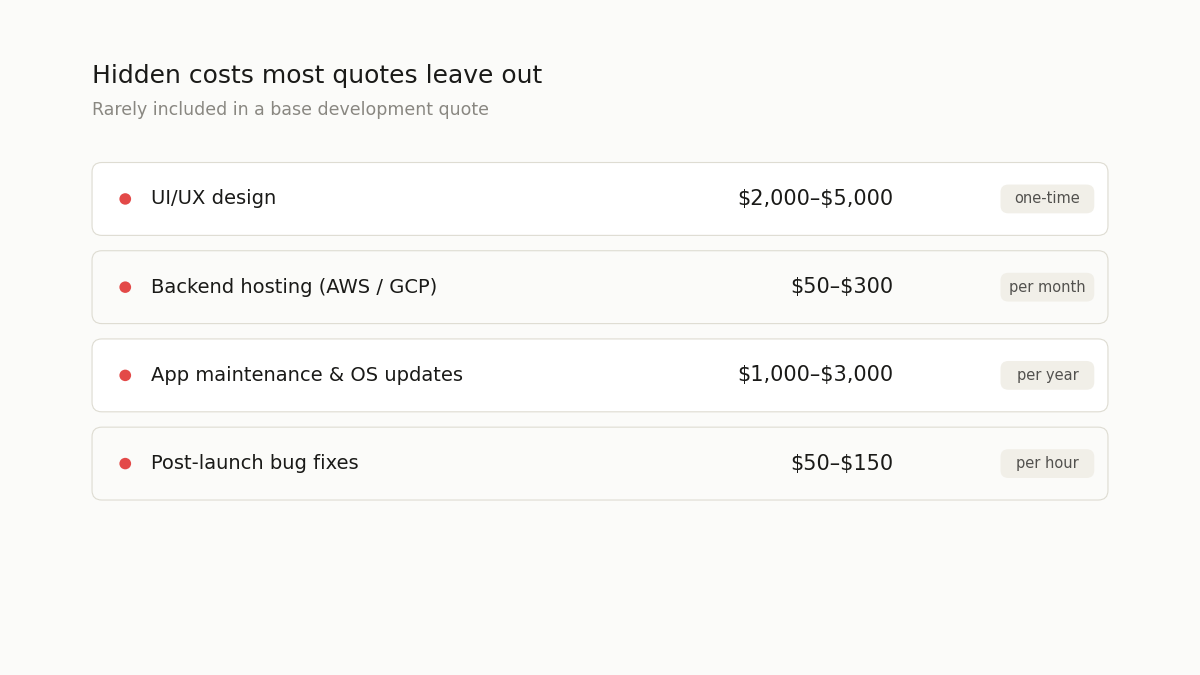
Most agency quotes for mobile app development cover exactly one thing: developer time. Everything else is additional. Buyers who do not account for these costs typically exceed their budget by 30 to 60%.
The complete mobile app budget what you actually need to plan for:
| Cost Item | Included in Most Quotes? | Realistic Cost |
| Development (coding) | ✅ Yes | The quoted amount |
| UI/UX design | Sometimes verify explicitly | $2,000–$5,000 if separate |
| Backend API development | Sometimes verify explicitly | May be additional to mobile quote |
| App icon and store assets | Rarely | $300–$800 |
| Apple Developer Account | No | $99/year |
| Google Play Developer Account | No | $25 one-time |
| App Store review time | Not a cost, but a timeline factor | 1–7 days for Apple, 1–3 days for Google |
| Crash reporting (Sentry, Crashlytics) | No | $0–$26/month |
| Push notification service | No | $0–$100/month depending on volume |
| Backend hosting (AWS, GCP, Railway) | No | $50–$300/month |
| Analytics (Mixpanel, Amplitude) | No | $0–$100/month |
| Post-launch bug fixes (beyond warranty) | No | $50–$150/hour |
| App maintenance (OS updates, library patches) | No | $1,000–$3,000/year |
The design cost is the most frequently missed:
When an agency quotes $10,000 for your app and does not mention design, they are either assuming you will provide the designs or they are planning to use a standard component library with no custom visual design. A quote that hides this assumption is often one of several red flags in a software development company worth checking for before you sign.
If you want a professionally designed app with custom icons, thoughtfully chosen typography, branded colour system, polished micro-interactions, budget an additional $2,000 to $5,000 for a designer, or confirm that your agency includes a dedicated designer at the quoted rate.
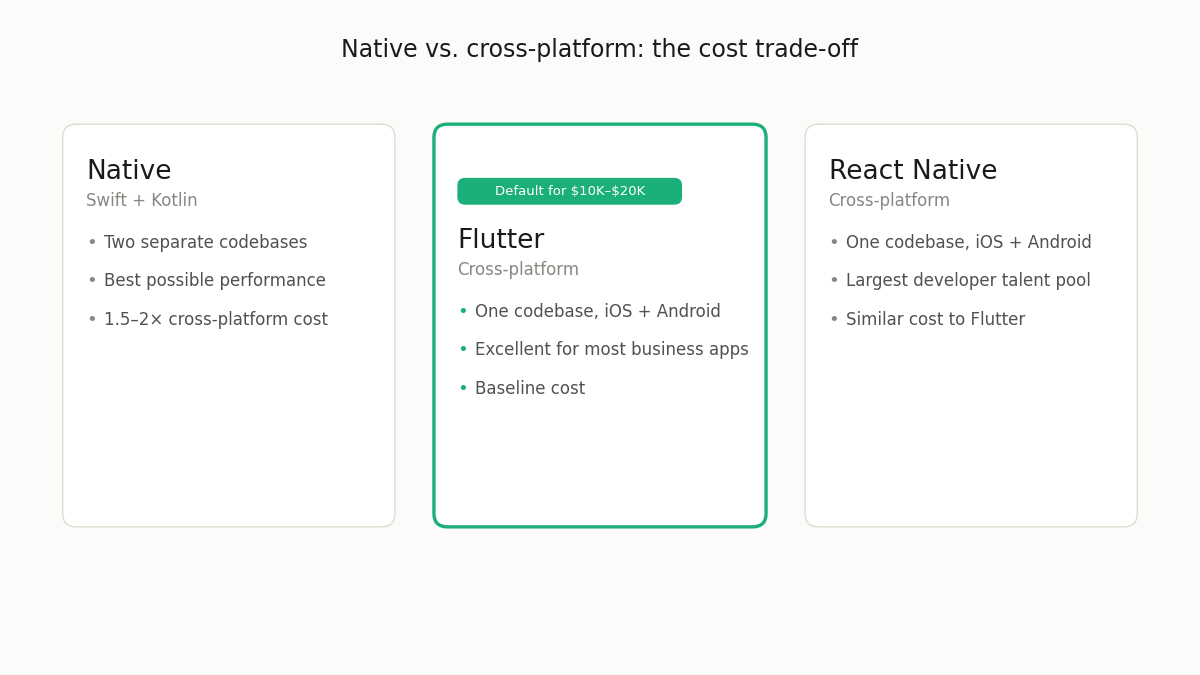
Native vs Cross-Platform The Cost and Quality Trade-Off
This question comes up in every mobile development conversation. The answer in 2026 is clear for most $5K to $30K projects: use cross-platform (Flutter or React Native).
The comparison:
| Dimension | Native (Swift + Kotlin) | Flutter | React Native |
| Performance | Best possible | Excellent for most use cases | Good for most use cases |
| Development cost | 1.5–2× cross-platform | Baseline | Similar to Flutter |
| Codebase | Two separate codebases | One codebase | One codebase |
| Developer availability | High (iOS), High (Android) | High and growing fast | Very high |
| Animation quality | Excellent | Excellent | Good |
| Platform UI guidelines | Perfect adherence | Near-perfect | Near-perfect |
| Hardware integration | Full access | Full access | Full access |
| Best for | Performance-critical, complex hardware integration | Most business apps | Most business apps with JS team |
For a $10,000 to $20,000 app budget, Flutter is the default recommendation because it delivers cross-platform coverage iOS and Android for the cost of a single-platform native app. The performance difference matters only for a narrow category of apps (games, real-time video processing, augmented reality) that are typically not in the $5K to $30K budget range anyway.
How to Get the Most Accurate Quote for Your App
The accuracy of any development quote is proportional to the clarity of the brief. These three documents, prepared before you post your project, will get you quotes that are within 20% of the final cost rather than 100% off the same principle covered in how to write software requirements.
A feature list with user stories “As a [user type], I want to [action], so that [benefit].” Write one user story for each meaningful feature. This forces specificity without requiring technical knowledge and gives agencies the context to estimate accurately.
Screen flows, even rough ones drawn on paper or in Figma showing which screens connect to which and what the main user journeys are. A 5-page screen flow for a 15-screen app takes 2 to 3 hours to create and reduces quote variance by 40%.
Integration list every external service your app needs to connect to. Stripe for payments, Twilio for SMS, Google Maps for location, an existing CRM for customer data. Each integration adds 10 to 40 hours. An incomplete integration list produces an incomplete quote.
Post your project with these three documents on getprojects.ai and the proposals you receive will be specific, comparable, and reliable not the vague ballpark estimates that come from one-paragraph briefs.
Frequently Asked Questions
How much does it cost to put an app on the App Store?
The fees themselves are modest: Apple charges $99 per year for an Apple Developer Program membership, which is required to submit apps to the App Store. Google charges a one-time $25 registration fee for the Google Play Developer account. The more significant cost is preparation for App Store submission, creating properly sized screenshots, writing compelling app descriptions, producing a demo video if required, configuring in-app purchase products if applicable, and completing Apple’s privacy questionnaire. Plan for $300 to $800 in time cost for proper App Store preparation, or confirm with your development agency that this is included in their scope.
Is it cheaper to build an iOS app or an Android app?
Native iOS and native Android apps cost approximately the same to build separately, both require a complete codebase, both require platform-specific expertise. The cost difference comes from cross-platform frameworks: a Flutter or React Native app that targets both iOS and Android from a single codebase costs 30 to 40% less than building separate native apps for each platform. If you can only afford one platform at launch, the platform choice should be driven by your target audience rather than cost iOS first for higher-income demographics and Western markets, Android first for emerging markets and price-sensitive audiences.
Do I need a backend for my mobile app?
Most mobile apps need a backend, the server-side component that stores data, handles authentication, implements business logic, and connects to external services. The exceptions are truly simple utility apps that work entirely offline with no user accounts and no external data. For any app that involves user accounts, cloud-synced data, connections to other services, or multi-user features, a backend is required. The cost of backend development is often quoted separately from the mobile app frontend when evaluating proposals, always confirming whether the quoted price includes both the mobile app and the backend API, or just the mobile frontend.
How long does Apple’s App Store review take and can it affect my launch timeline?
Apple’s App Store review time averages 1 to 3 days for standard submissions in 2026, with occasional reviews taking up to 7 days for first-time submissions or apps with more complex functionality. Google Play’s review process averages 1 to 3 days. Plan for up to 2 weeks of buffer in your launch timeline for App Store review cycles, rejection revisions, and resubmission. First submissions are rejected at a higher rate than updates; common reasons include incomplete privacy policy links, missing required device permissions justification, and placeholder content left in the app. A development agency with App Store submission experience will pre-check all of these requirements before submitting, reducing the probability of rejection.